
Blogs
UI Automation vs AI AutomationThe Evolution of Software Testing in the Age of Intelligence
Overview:
For over a decade, UI automation has been the backbone of modern software testing. Tools like Selenium, Cypress, and Playwright enabled teams to accelerate regression cycles and improve release confidence. However, as applications became more dynamic, distributed, and fast-changing, traditional automation began to show its limitations.
Enter AI-powered automation—a paradigm shift that augments classical automation with intelligence, learning, and adaptability.
This blog explores UI Automation vs AI Automation, clarifying differences, benefits, limitations, and when each approach makes sense.
What Is Traditional UI Automation?
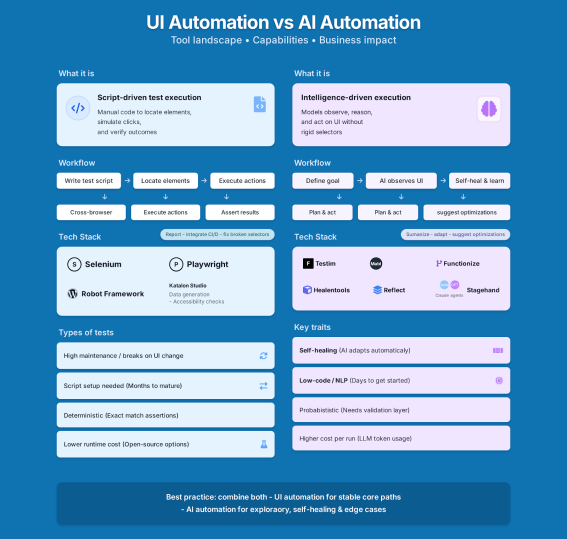
UI automation refers to script-based testing where predefined steps validate application behavior through the user interface.
Core Characteristics
- Rule-based and deterministic
- Depends on stable locators and flows
- Requires human-designed test cases
- Predictable and repeatable
Common Tools
- Selenium
- Playwright
- Cypress
- WebdriverIO
Typical Workflow
- Tester writes test cases
- Automation engineer scripts them
- Scripts run in CI/CD
- Failures require manual analysis and fixes
Strengths of UI Automation
- Proven and mature
- Fully controllable and transparent
- Strong ecosystem and community
- Ideal for stable regression scenarios
- Low tool licensing cost (many are open source)
Limitations of UI Automation
Despite its success, UI automation struggles with:
- Fragile locators (DOM/UI changes break tests)
- High maintenance effort
- Limited coverage due to scripting cost
- Manual test design dependency
- Reactive defect detection
As delivery velocity increases, these limitations become bottlenecks.
What Is AI Automation?
AI automation enhances traditional automation using machine learning, NLP, and analytics to make testing adaptive, predictive, and self-improving.
AI does not replace automation—it augments it.
Core Characteristics
- Learns from application behavior
- Generates tests from requirements
- Heals itself when UI changes
- Prioritizes tests based on risk
- Analyzes failures intelligently
Common AI Testing Capabilities
- AI-generated test cases
- Self-healing locators
- Visual AI validation
- Intelligent test prioritization
- Defect clustering and prediction
Popular AI Testing Tools
- Testim
- Mabl
- Functionize
- Applitools (Visual AI)
- Healenium
- GenAI-based test agents (custom)
UI Automation vs AI Automation: A Comparison
| Dimension | | UI Automation | | AI Automation |
|---|---|---|
| Test creation | Manual scripting | AI-generated from requirements |
| Maintenance | High | Low (self-healing) |
| Adaptability | Low | High |
| Failure analysis | Manual | AI-assisted |
| Coverage scalability | None | Continuous |
| Learning capability | Coding | Quality strategy & validation |
Key Use Cases Comparison
AI automation enhances traditional automation using machine learning, NLP, and analytics to make testing adaptive, predictive, and self-improving.
AI does not replace automation—it augments it.
Where UI Automation Excels
- Stable legacy applications
- Compliance-driven testing
- Highly controlled environments
- Teams with strong coding expertise
- Cost-sensitive programs
Where AI Automation Excels
- Rapidly changing UI
- Agile / DevOps environments
- Large regression suites
- Limited test design bandwidth
- Enterprise-scale products
Example Scenario
Scenario: A login page UI changes its layout.
AI does not replace automation—it augments it.
- UI Automation:
Test fails → Engineer investigates → Locator updated → Test re-run
- AI Automation:
Test fails → AI identifies alternate locator → Test heals itself → Execution continues
The difference is reactive vs adaptive testing.
Does AI Automation Replace UI Automation?
No
AI does not replace automation—it is an evolution
The most successful organizations adopt a hybrid model:
- Use traditional automation frameworks as the foundation
- Layer AI intelligence on top for resilience and efficiency
The Hybrid Future of Testing
A modern QA stack looks like this:
- Selenium / Playwright for core automation
- AI test generation for faster coverage
- Self-healing for stability
- Visual AI for UI correctness
- Predictive analytics for release risk
This approach delivers speed, stability, and confidence.
Challenges with AI Automation (Reality Check)
- Tool maturity varies
- Explainability can be limited
- Over-reliance without governance is risky
- Requires strong QA fundamentals
- Licensing costs may apply
AI amplifies quality practices—it does not fix poor ones.
Skills Shift for Testers
| Traditional Focus | | Future Focus |
|---|---|
| Writing scripts | Designing quality strategies |
| Fixing locators | Validating AI decisions |
| Executing tests | Interpreting risk & analytics |
| Manual analysis | AI-assisted insights |
Conclusion
UI automation laid the foundation. AI automation defines the future.
Organizations that succeed will not choose one over the other—they will blend both intelligently.
The goal of testing is not automation.
The goal is risk reduction and release confidence.
AI simply helps us achieve that goal faster and smarter.
Final Takeaway
- UI Automation = Control & Predictability
- AI Automation = Adaptability & Intelligence
- Hybrid Model = Sustainable Quality Engineering
Content Quick Links
- Overview
- What Is Traditional UI Automation?
- Strengths of UI Automation
- Limitations of UI Automation
- What is AI Automation ?
- Popular AI testing tools
- UI Automation vs AI Automation: A Comparison
- Key Use Cases Comparison
- Example Scenario
- Does AI Automation Replace UI Automation?
- The Hybrid Future of Testing
- Challenges with AI Automation (Reality Check)
- Skills Shift for Testers
- Conclusion
- Final Takeaway